AI veneer preview: try veneers on your own photo
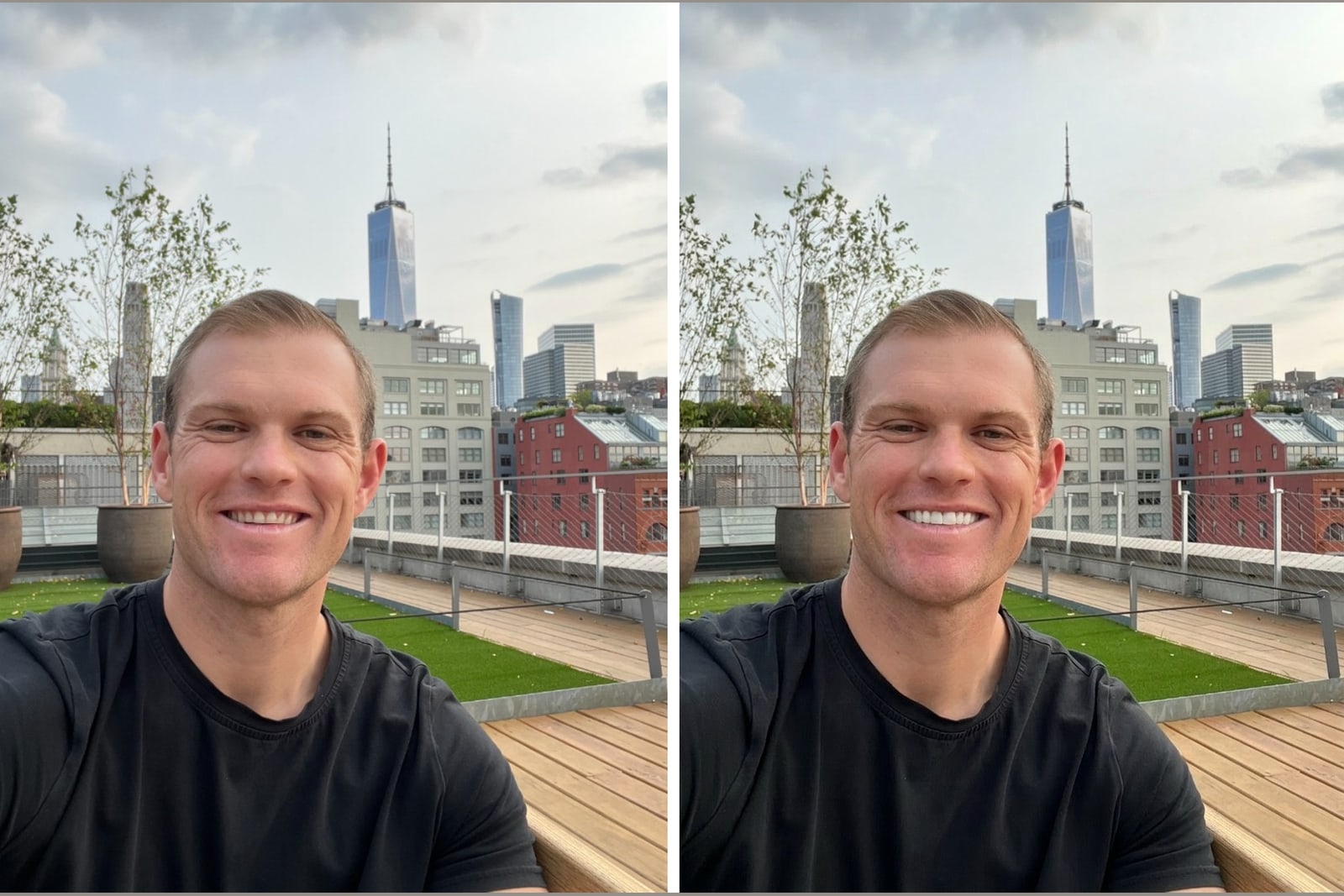
An AI veneer preview shows what veneers could look like on your own smile using a single front facing photo. You upload the photo, choose a style and shade, and the tool redraws only the teeth in about 60 seconds. It is an aesthetic preview, not dental advice, so you can compare looks before you commit.
Key takeaways
- An AI veneer preview edits only the teeth in your own photo, leaving your face unchanged.
- A sharp, well lit, front facing photo with teeth showing gives the most accurate result.
- Veneerly renders ten designs across five styles in about 60 seconds from one photo.
- A preview shows shape, style, and shade. It does not diagnose or plan dental work.
- Payment is one time from 39 dollars, so you can explore looks without a subscription.
Veneerly is an aesthetic preview tool. It is not dental or medical advice and it is not a substitute for a consultation with a licensed dentist.
What is an AI veneer preview?
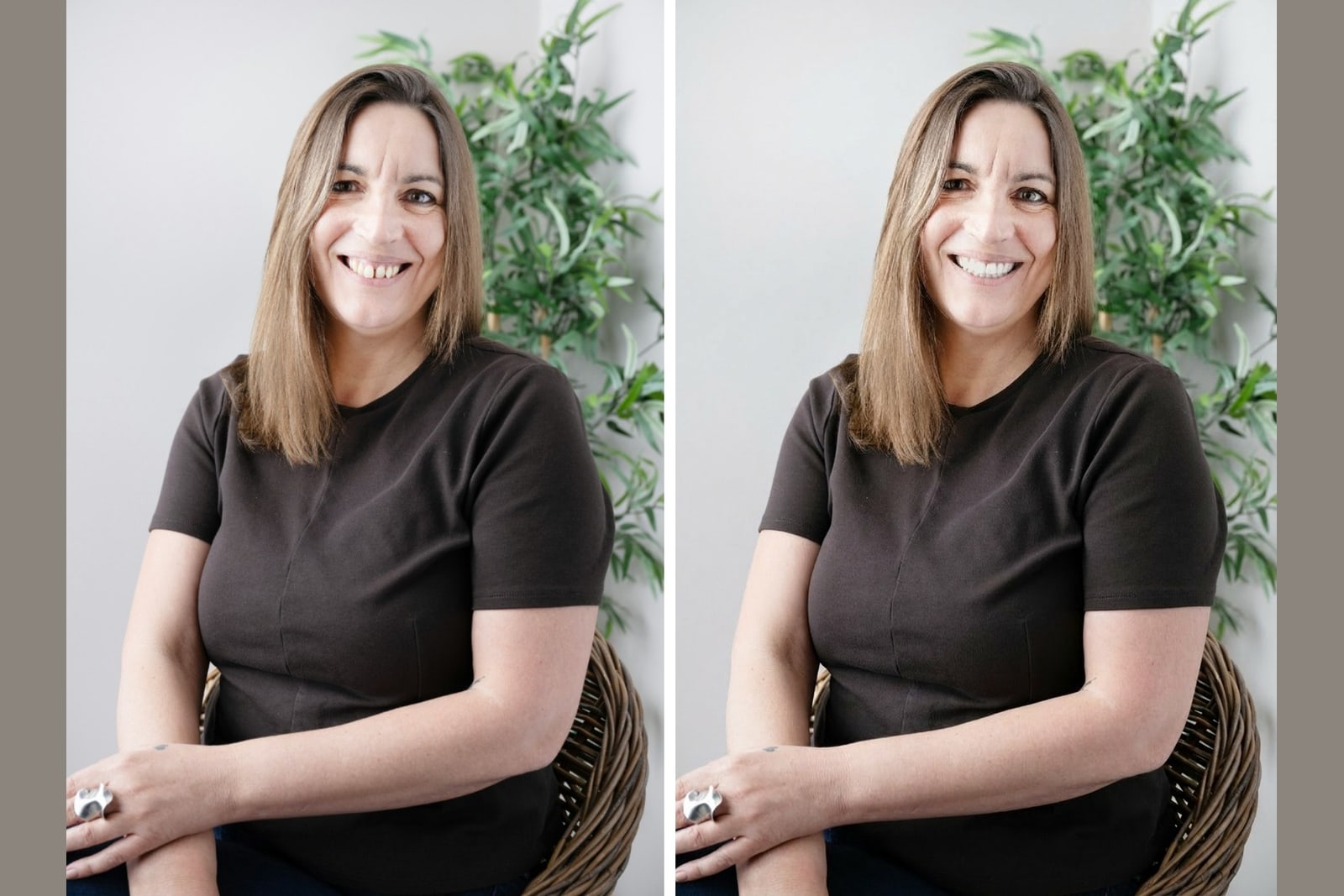
An AI veneer preview is a tool that renders veneers onto a photo of your real smile so you can see the look before any dental work. It reads the position, shape, and size of your teeth, then redraws them in the style and shade you pick. With Veneerly, only the teeth change. Your lips, skin, and face stay exactly as they are in the photo, so the result reads as your smile, not a stock model.
This matters because imagining veneers is hard. A preview turns a vague idea into a picture you can actually judge. If you want the full walk through, see see yourself with veneers.
How does an AI veneer preview work?
You give the tool a photo, it maps your teeth, and it repaints them in your chosen style and shade. The steps are short and there is no software to install.
- Upload one front facing photo where your teeth show.
- Pick a style, from Soft Natural to Ultra Bright.
- Set a shade from Natural Ivory (A1) to Ultra White (BL1).
- Wait about 60 seconds while the teeth are redrawn.
- Compare the before and after side by side.
Veneerly produces ten designs across five styles from that one photo, so you are not judging a single guess. You get a spread to compare, which makes the differences between styles easy to see on your own face.
What makes a good source photo?
A sharp, evenly lit, front facing photo with your teeth visible gives the most accurate preview. The AI can only redraw teeth it can clearly see, so the input photo sets the ceiling for the result.
| Photo trait | Do this | Avoid this |
|---|---|---|
| Angle | Face the camera straight on | Side profiles or steep tilts |
| Lighting | Even, natural light on your face | Harsh shadows or strong backlight |
| Smile | Show your teeth, relaxed and open | Lips closed or teeth hidden |
| Focus | Sharp and in focus | Blurry or low resolution |
| Distance | Head and shoulders framing | Far away or heavily zoomed |
A quick self check: can you clearly see the edges of your front teeth in the photo? If yes, the preview has what it needs. For more on reading your result, see What will my veneers look like on me?.
What can an AI veneer preview show?
A preview shows the aesthetic result: shape, style, and shade on your own smile. That is enough to answer the questions people actually have before committing to veneers.
- How a straighter, more even smile would look on your face.
- The difference between a natural white and Ultra White (BL1).
- How five styles change the character of your smile, from soft to bold.
- Whether a bright shade fits the rest of your face or fights it.
What can it not show?
An AI veneer preview is an aesthetic tool, not dental or medical advice. It cannot examine your teeth, check your gums, or plan treatment. It will not tell you whether you are a candidate for veneers, how many teeth to treat, or what a dentist would recommend for your bite and enamel. Those questions belong to a dental professional. Think of the preview as the visual starting point you bring to that conversation, not a replacement for it.
Why compare ten designs instead of one?
Seeing ten designs across five styles removes the guesswork of picking blind. A single render answers one question. A spread lets you compare Soft Natural against Hollywood Bold on the same photo, and test where the shade tips from believable to too white. Because Veneerly changes only the teeth, every design sits on the same face, so the comparison is fair and the differences are the veneers, not the lighting or angle.
How much does a Veneerly preview cost?
Veneerly is a one time payment from 39 dollars, with no subscription. You upload your own photo, get ten designs across five styles in about 60 seconds, and keep the results to compare on your own time or share with a dentist. There is no recurring fee and no login required for a stock preview of your smile.
Frequently asked questions
Is an AI veneer preview accurate?
It is an accurate aesthetic preview of shape, style, and shade on your own smile, and the accuracy tracks the quality of your photo. A sharp, front facing photo with teeth showing gives the closest result. It is not a dental plan and does not predict a clinical outcome.
Does the AI change my whole face?
No. Veneerly redraws only the teeth in your photo. Your lips, skin, and face stay exactly as they are, so the result reads as your own smile rather than a stock model.
How long does a veneer preview take?
About 60 seconds. You upload one photo, pick a style and shade, and the tool returns ten designs across five styles. There is no waiting on a consultation to see the look.
Do I need a special photo?
You need a clear, front facing photo with your teeth visible and even lighting. A regular phone photo works well as long as your front teeth are in focus and not hidden behind your lips.
Can a preview replace a dentist?
No. A preview is an aesthetic tool that shows a look, not a diagnosis or treatment plan. Use it to explore styles and shades, then take your favorite designs to a dental professional for real advice.
What does it cost to preview veneers?
Veneerly is a one time payment from 39 dollars with no subscription. You get ten designs on your own photo and keep the results to compare or share.
See veneers on your own smile
Upload one photo and get ten designs across five styles in about 60 seconds, from a one time payment of 39 dollars.
Preview my smile